The Student Database Schema
You’ll need to connect to the database before this section is useful to you! Follow the instructions in 2 Course Setup to get connected.
View the STUDENT Schema Tables
Once connected, you can explore the schema using the GUI or SQL query.
-- View Tables with Comments (recommended query)
SELECT *
FROM all_col_comments
WHERE owner = 'STUDENT'
  AND table_name NOT LIKE 'BIN%';
This will return all tables and column-level documentation available in the STUDENT schema.
Tables beginning with the word
BINreference recently deleted items. We have written the query above to exclude them from your results.
For more details, consult Labs 1.3 and 2.1 in Oracle SQL by Example (4th Edition).
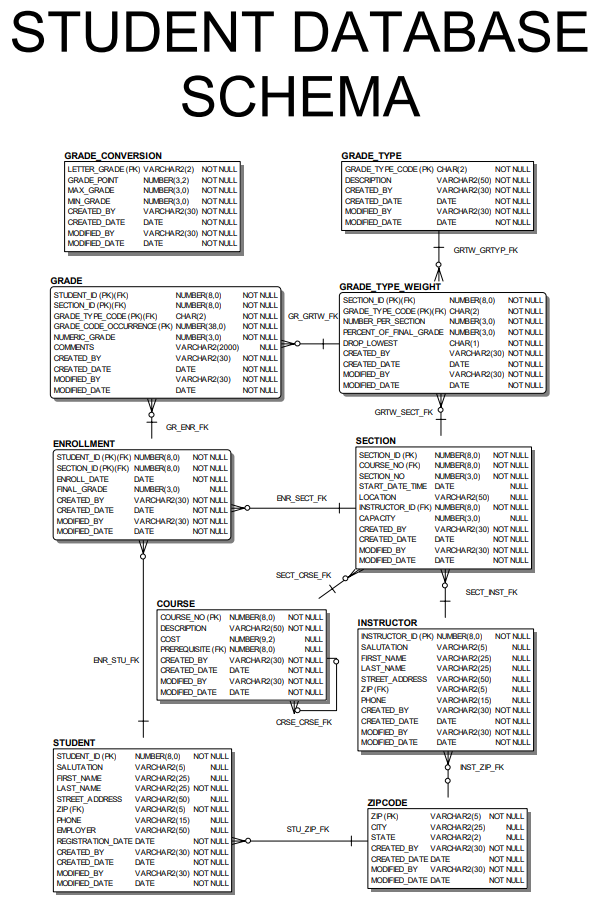
Database Map
Refer to Appendix D of Oracle SQL by Example (4th Edition) for a detailed schema diagram or download a PDF version of the schema diagram here: STUDENT Database Schema PDF.
Data Dictionary
This schema is used throughout the course to support querying, aggregating, and manipulating real-world academic data.
The STUDENT schema includes the following core tables:
| Table Name | Description |
|---|---|
| STUDENT | Stores personal and contact information for each student. |
| COURSE | Lists available courses including descriptions and prerequisites. |
| SECTION | Represents specific course sections offered at particular times and locations. |
| ENROLLMENT | Records which students are enrolled in which sections, including final grades. |
| INSTRUCTOR | Contains contact and profile information for instructors. |
| GRADE | Records student grades for individual assignments or exams. |
| GRADE_TYPE | Defines grade categories such as homework or midterm. |
| GRADE_TYPE_WEIGHT | Specifies how grade types contribute to final grades for a section. |
| GRADE_CONVERSION | Maps numeric grades to letter grades and grade points. |
| ZIPCODE | Maps ZIP codes to city and state names for address normalization. |